
Description of the problem
If we want to establish PTP synchronization through a switch between a grandmaster clock and an Obsidian device, an X-line device, or a Sirius‑XHS, it is important to configure the switch correctly.
This solution shows an example configuration for the PLANET IGS-5225-8P2S2X to make it work with X-line devices.
Because switch settings vary by manufacturer, we cannot provide a universal configuration. Customers are responsible for ensuring their switches are configured correctly; any assistance from customer support is provided as a courtesy and at the discretion of our team.
Basic parameters
Listed below are the basic parameters to consider when setting up a switch:
- Enable all ports used in synchronization

- Set the correct time synchronization profile:
A time synchronization profile is a predefined set of rules and parameters that tells devices how to synchronize their clocks over a network. We commonly work with two types:- Default E2E IEEE1588-2008
- End-to-End delay mechanism
- The system measures the total delay from master clock to slave clock across the whole network path
- Is supported and should always be set
- Default P2P IEEE1588-2008
- Peer-to-Peer / Point-to-Point delay mechanism
- Measures delay between each pair of directly connected devices
- Is not supported, and should not be used
- Default E2E IEEE1588-2008
- Set the correct Transport mode/Network protocol:
Transport mode defines how the timing messages are carried over the network. We commonly speak of two modes.- IEEE 802.3 Ethernet (L2)
- Is used when we work with X-line devices
- IPv4/Multicast / UDP/IPV4 (L3)
- Is used when we work with OBSIDIAN or XHS devices
- IEEE 802.3 Ethernet (L2)
- Set the correct clock type:
Clock type describes a role the switch plays in distributing or receiving time on the network. We usually speak of two types:- Transparent clock
- In this case, a switch doesn't work as either the master or a slave (it doesn't generate time). Rather, it corrects timing delays as packets pass through.
- The switch doesn't "participate" in synchronization and is only used to improve accuracy and pass on the time information.
- Boundary clock
- The switch acts as a slave on one port (to get time from the Master clock), and as a master on the other ports (to distribute time). In this case, the switch does participate in synchronization as a Master.
- Transparent clock
- Set the correct Domain number:
The domain number is a group label for network backup (ring) connections.- Domain = 0
- This means that we are not setting up any special backup loops, and this is the default loop.
- Domain = 0
- Set PTP timestamping method:
Timestamping method describes how a device provides the exact transmission timestamp for a Sync message.- One-step
- The device inserts the precise timestamp directly into the Sync packet as it is sent.
- Two-step
- The device first sends a Sync packet without the exact timestamp and then sends a follow-up packet containing the precise timestamp.
- One-step
To determine whether synchronization issues are caused by the switch or a Dewesoft device, we recommend first connecting the Grandmaster clock directly to the Dewesoft device using one Ethernet port, and connecting the device's second Ethernet port directly to the PC. Set up PTP synchronization in DewesoftX and verify whether synchronization works in Measure mode.
If synchronization works in this configuration, the problem is likely in the switch settings.
If synchronization does not work, the issue is likely with the Dewesoft device or the grandmaster clock.
Configuration examples:
- PLANET IGS-5225-8P2S2X configuration and Meinberg Grandmaster clock configuration when the device is a SIRIUS X:
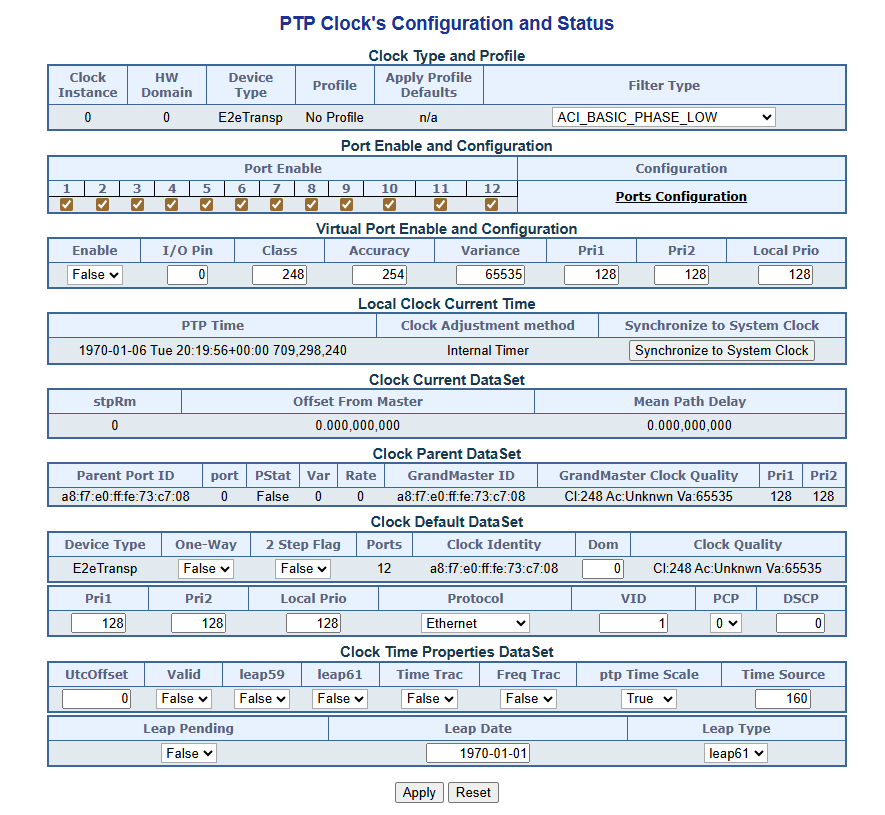
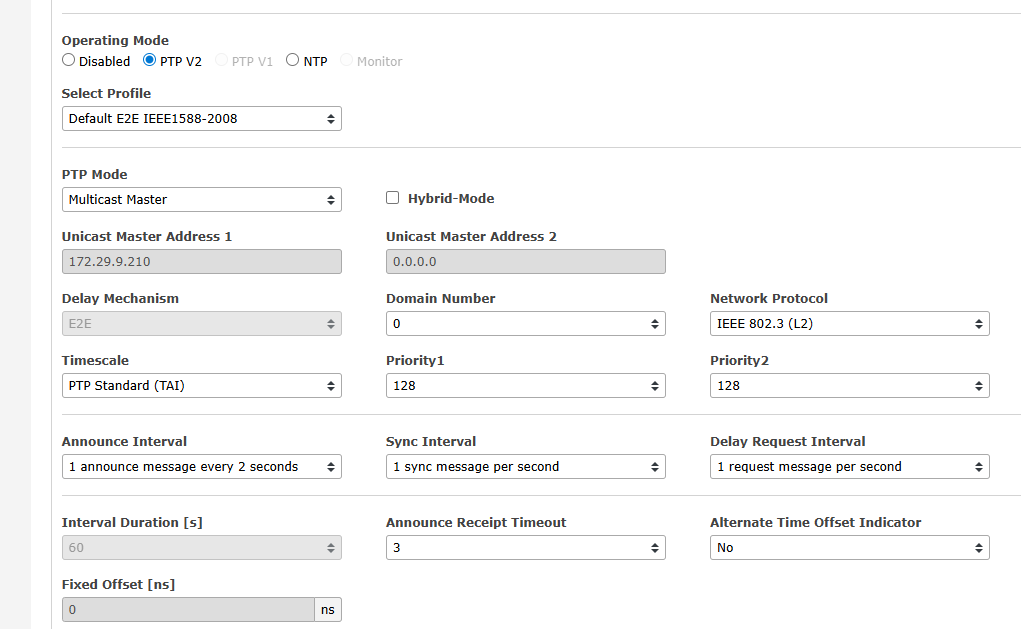
- MOXA RKS-G4028-4GS-HV-T configuration and Meinberg Grandmaster clock configuration when the device is an OBSIDIAN:
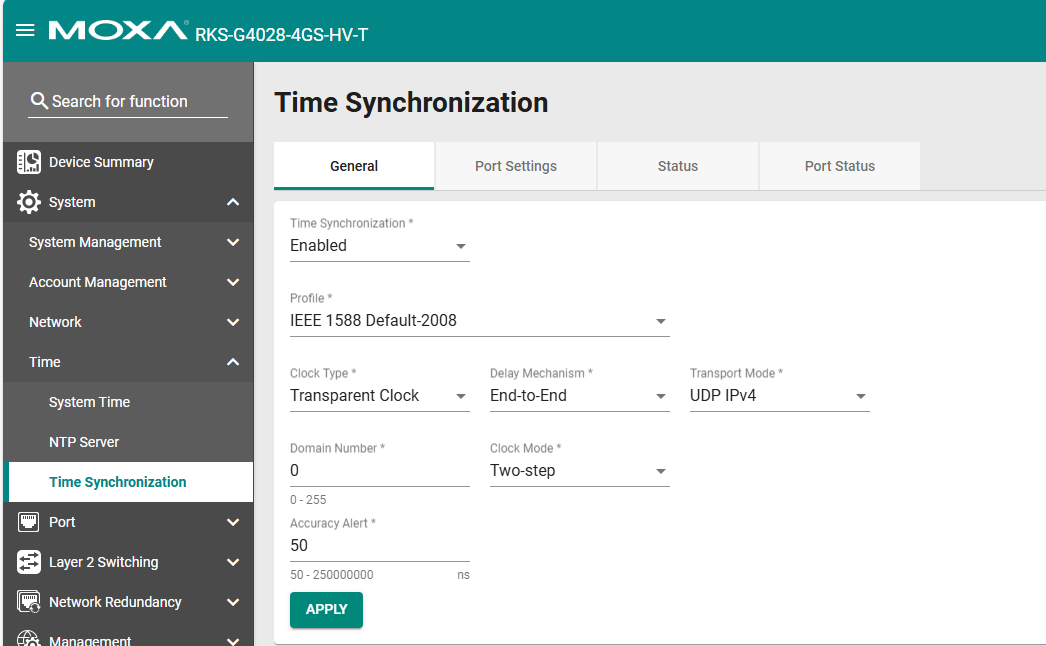
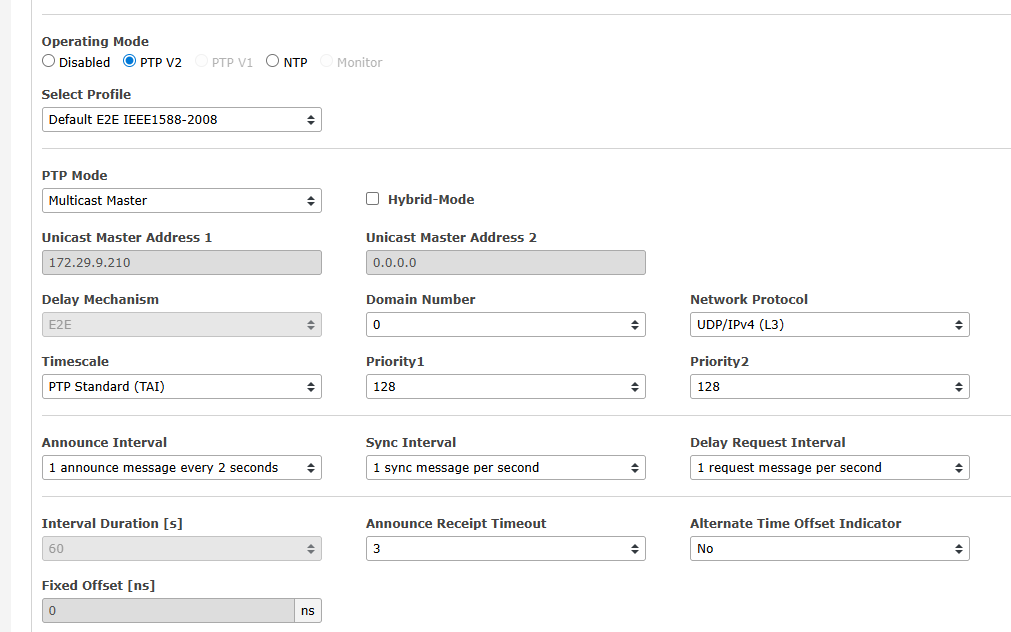
These examples cover only the switch's PTP configuration — other settings on the switch could still prevent synchronization.
Additional information
- If you are a DewesoftX user:
- Dewesoft's manual regarding Network switches
- If you are an Agent:
- Additional information regarding Planet switch configuration